
Quotes, invoices and what you actually made.
Price a job, turn it into an invoice when they say yes, and see your profit for any date you like. Built for one-person businesses and small teams who would rather be doing the work.
From £120 a year. Two weeks free, no card, nothing to install.
What it does
Quotes that become invoices
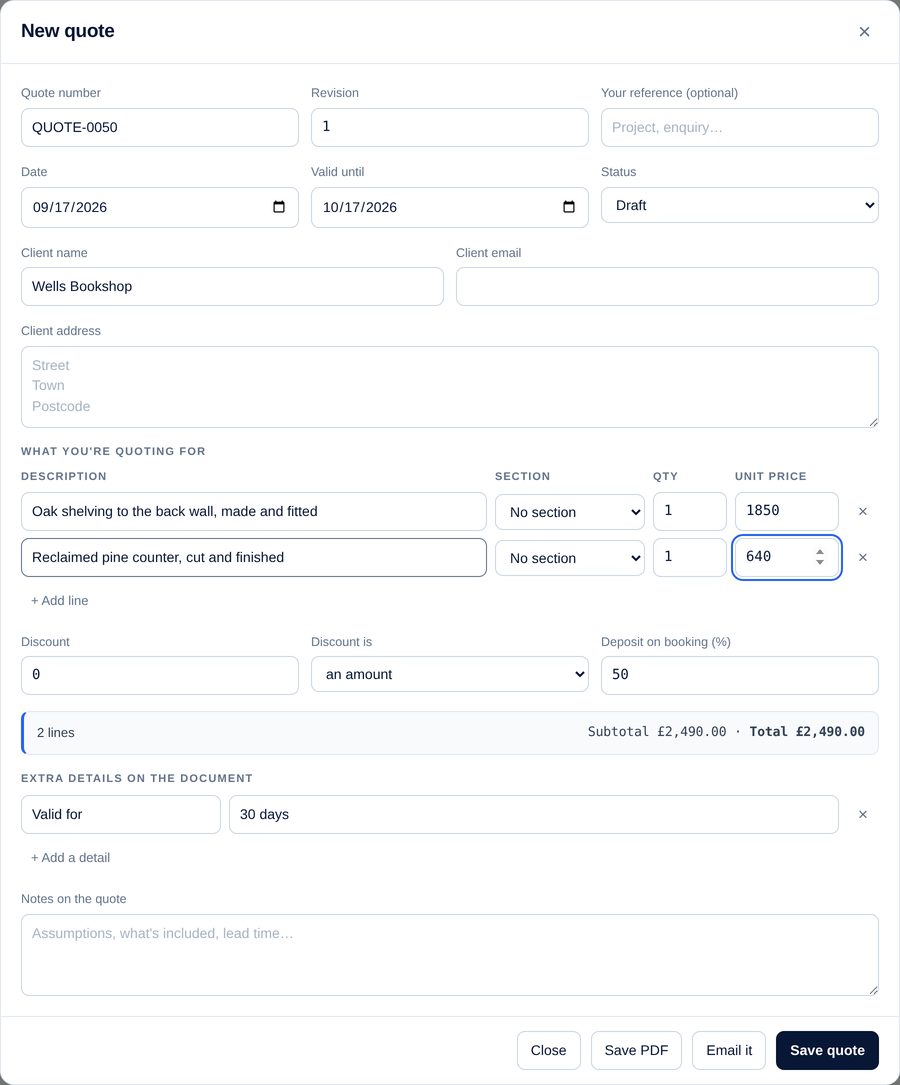
Price a job once. When the customer says yes, the quote becomes an invoice on the next number with every line, discount and deposit already on it. Earlier versions are kept, so you can always see what you actually quoted.
Send it in one click
Email a quote or invoice as a PDF with a covering message you can edit first. A copy lands in your own inbox automatically, so you always have a record of exactly what they got.
Receipts, read for you
Photograph a receipt or forward the email, and the supplier, date, total and VAT are read off it ready to confirm. Nothing is filed until you say so.
Know where you stand
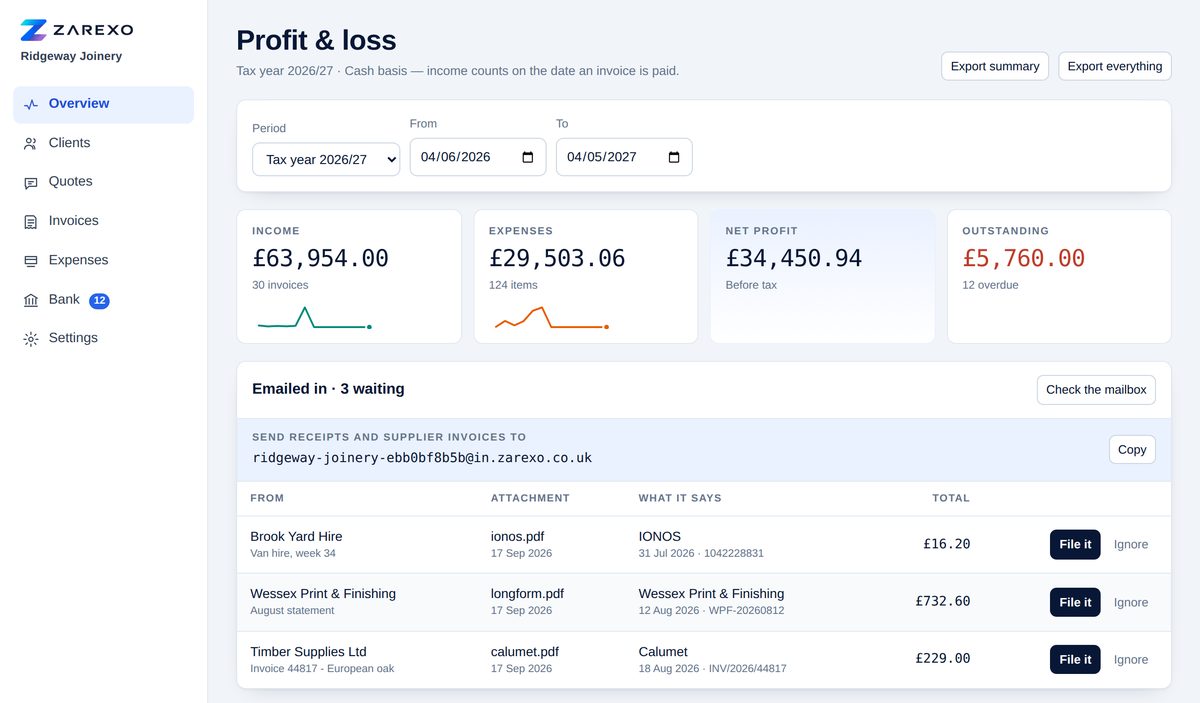
Profit for the tax year, the quarter, or any two dates you pick. What is still owed to you, what is overdue, and how the year is tracking — without waiting for anyone to add it up.
VAT that behaves
Standard, reduced and zero rates per line, split out properly on the invoice. Not VAT registered? It stays out of your way entirely until you are.
Nothing lost by accident
Delete something you did not mean to and it waits thirty days to be put back, exactly as it was. Your figures are yours, exportable whenever you want them.
Made to look like your business, not ours
Your logo, your colours, your words
Put your logo on every document, pick the two colours it is drawn in, and rewrite any phrase it prints — right down to the note explaining what a quote is. Nothing on paper has to sound like software.
A layout that fits the trade
A plain list of lines, or materials and labour split into their own sections with a summary and a deposit. Whichever suits the way you price work.
Locked down properly
A password and then a code to your email, every time you sign in from somewhere new. Your figures are nobody else's business, including ours.
Three versions
Everybody gets clients, quotes and invoices. The difference is how much of the rest of the paperwork you want it to carry. Move up or down whenever you like — nothing is lost either way.
Lite
£120a year
Quote, invoice, get paid.
For anyone whose books are a quote, an invoice and a note of who has paid.
Most people start here
Standard
£150a year
And what it cost you.
Adds what you spend, with the receipt attached — so the profit figure is a real one.
Full
£180a year
And the bank checked off.
Adds your bank statement, matched against the invoices and expenses for you.
| What you get | Lite£120 | Standard£150 | Full£180 |
|---|---|---|---|
| Clients, and their history | ✓ | ✓ | ✓ |
| Quotes, and quote-to-invoice in one press | ✓ | ✓ | ✓ |
| Invoices, numbered and branded | ✓ | ✓ | ✓ |
| Your logo, colours and wording on documents | ✓ | ✓ | ✓ |
| Email a quote or invoice as a PDF | ✓ | ✓ | ✓ |
| VAT, at standard, reduced and zero rates | ✓ | ✓ | ✓ |
| Profit for any period you pick | Income | ✓ | ✓ |
| Expenses, with the receipt attached | – | ✓ | ✓ |
| Photograph a receipt from your phone | – | ✓ | ✓ |
| Email receipts and supplier invoices in | – | ✓ | ✓ |
| Where the money went, by category | – | ✓ | ✓ |
| Import your bank statement | – | – | ✓ |
| Payments matched to invoices for you | – | – | ✓ |
| Export everything, whenever you like | ✓ | ✓ | ✓ |
| Two weeks free first | ✓ | ✓ | ✓ |
| Updates and support | ✓ | ✓ | ✓ |
All prices are for a year, paid annually, and held for the whole of your year. Stop whenever you like — it simply doesn’t renew.
Receipts without the shoebox
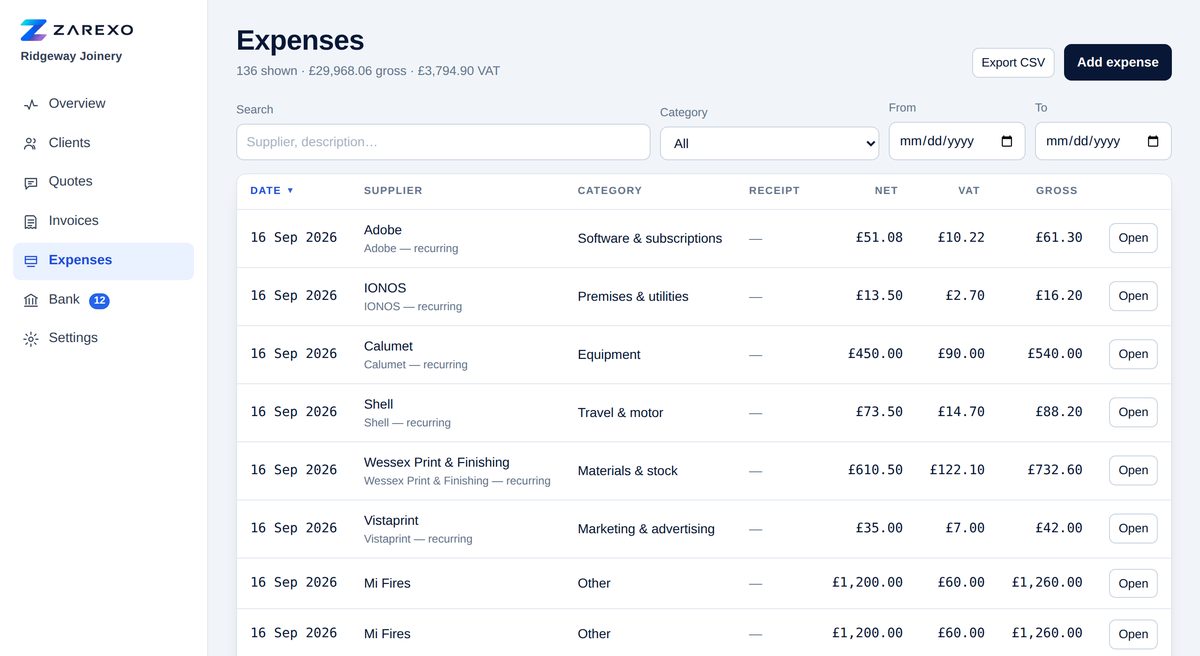
Photograph one on the phone, or forward the supplier’s email to your own address here. The supplier, date, total and VAT are read off it and wait for you to confirm — nothing is put in your books on its own.
Where the money actually went
Your spending by category, largest first. Usually at least one surprise.
And the bank, checked off
On Full, import the statement your bank gives you and payments are matched against invoices and expenses for you. Anything it is not certain about waits for your say-so.
Start your two weeks
Accounts are set up by hand at the moment, which means a short conversation rather than a checkout. Tell me about the business and I will have you up and running, usually the same day.
Questions people ask first
Which one should I have?
If you only need to quote and invoice, Lite. If you want the profit figure to be a real one — income less what it cost you — Standard. If you would rather not tick off your bank statement by hand, Full.
Can I change my mind later?
Yes, either way, and nothing is lost when you do. Moving up switches the extra screens on; moving down puts them away and leaves your records exactly where they are.
What happens after the two weeks?
I’ll ask whether you want to carry on. If you do, you get an invoice for the year. If you don’t, nothing happens and nothing is charged — there is no card on file to charge.
Do I have to install anything?
No. It runs in a browser — laptop, tablet or phone — and there is nothing to download, update or back up yourself.
Can I get my figures out?
Whenever you like, without asking anybody, on every version. Invoices, expenses, quotes and clients all export to spreadsheet files your accountant can open.
Does it do my tax return?
No, and it doesn’t pretend to. It keeps the records straight and works out profit for any period — which is exactly what your accountant asks you for. Filing stays with you or with them.
Is my data safe?
Signing in takes a password and a code sent to your email. There are no trackers, no advertising, and nobody else reading your figures. The privacy page spells it out.
What if I need help?
You email me and I answer. There is no call centre and no ticket number — you are dealing with the person who built it.